Practical P3D Flight Handbook
Introduction
PC based flight simulation is a rewarding pastime, but can also be rather overwhelming. Which software to choose? Which add-ons to buy (BTW: some of the best are free!). Where do I start? The purpose of this P3D handbook is to be a comprehensive guide to get started. Lockheed Martin Prepar3D (P3D v4) is the subject of this handbook, but it will help with other PC flight-sims as well. So just follow along!
Although not all steam gauge trained pilots may agree, I believe that the transition from old school flying and instrumentation to the new automated glass cockpit aircraft is easier than vice versa. So we'll start with an aircraft with typical non-digital instruments for our introduction to flight simming.
Basic needs
Things we will need for a basic setup are:
Hardware
-
PC or laptop (64bit) with Windows 10
-
Keyboard and mouse
-
Decent monitor
-
Joystick (usb), preferably with throttle handle and rotation (yaw / z-axis) option; e.g. like these:
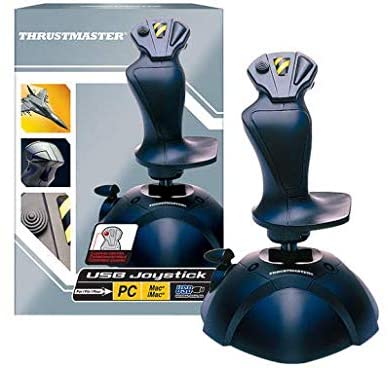
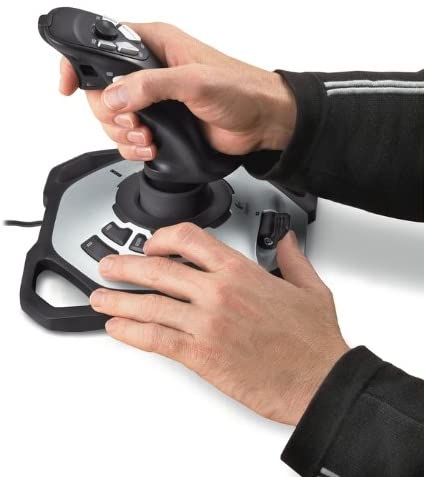
Thrustmaster usb PC Joystick Logitech G Extreme
3D Pro Precision Flight Stick - No joystick?: If need be you can fly the simulator using your mouse (as yoke). In that case I suggest you make extensive use of the autopilot functions.
Software
- P3D v4.x installation
This guide may also be valuable with other PC based flight-simulator software like:- Microsoft Flight Simulator X (FSX, FSX Steam edition).
NOTE: FSX is 32 bit software, which occasionally tends to surprise you with Windows (run out of available) Memory errors. Usually precisely on final approach after a long flight! - X-Plane 11, with the best flight model thus far,
- The new(!) Microsoft Flight Simulator MSFS 2020,
but will refer to Lockheed Martin Prepar3D (P3D) version 4.5 for its examples.
- Microsoft Flight Simulator X (FSX, FSX Steam edition).
We'll also be looking at (free!) additional tools, like cool extra aircraft, scenery, maps, websites and flight planning software.
Installing the software
To install your copy of P3D you will need a download location, a License ID and an License Activation Password.
Download P3D purchased downloads
After installation P3D will ask for your License ID and License Activation Password, to authorize use.
You will need to be online for this. By the way: installation and every start-up will take some time, because P3D needs to load the various aircraft models and scenery files.
Make sure your hardware is connected and configured, before you start-up P3D.
| <- home | next -> | |
|---|---|---|